

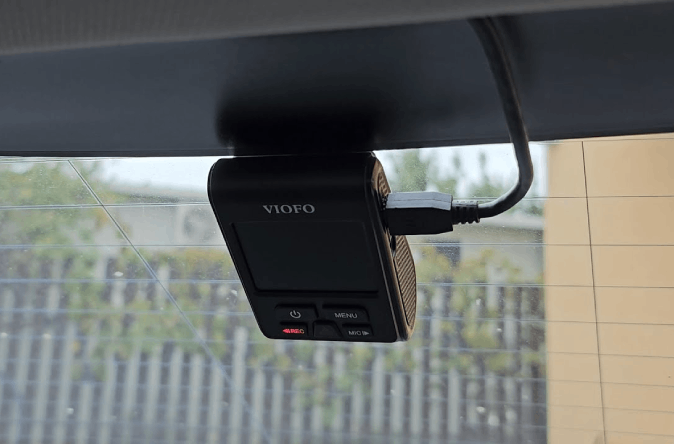
For drivers seeking top-tier vehicle security, the Halo Pro Dash Camera is an exceptional choice. Offering professional-grade features and reliable performance, it provides both high-definition recording and advanced monitoring capabilities. With the Halo Pro features designed for clarity, convenience, and security, this dash cam is ideal for personal vehicles and fleet management alike.
A properly installed Halo Pro dash cam acts as both a deterrent to theft and a valuable tool for capturing evidence in accidents or incidents on the road. In this guide, we will walk you through installation, setup, key features, and best practices for maximising the performance of your vehicle camera system.
Why Choose the Halo Pro Dash Camera
The Halo Pro Dash Camera stands out due to its combination of durability, clarity, and advanced features:
- High-resolution recording: Captures clear footage in 1080p or 4K, depending on the model.
- Wide field of view: Covers multiple lanes, reducing blind spots.
- Professional dash cam design: Built for continuous use and long-term reliability.
- Multiple recording modes: Standard, event-triggered, and parking mode recording options.
These Halo Pro features make it a professional-grade dash cam suitable for both personal use and fleet vehicles.
Key Features of the Halo Pro Dash Camera
1. High-Definition Video
The camera records in full HD or higher, providing clear footage for road incidents, parking surveillance, and insurance claims.
2. Wide Dynamic Range
This ensures the camera can handle varying light conditions, capturing clear footage in bright sunlight or low-light situations.
3. Parking Mode
The Halo Pro can monitor your vehicle even when parked, detecting motion or impacts and recording automatically to provide crucial evidence.
4. Loop Recording
Continuous recording with automatic overwriting ensures you never run out of storage space while maintaining recent footage.
5. G-Sensor Integration
The built-in G-sensor detects sudden impacts or abrupt movements, locking footage to prevent accidental deletion during critical events.
6. Mobile App Integration
Connect the Halo Pro to your smartphone to view live footage, adjust settings, and download recordings conveniently.
7. Durable and Reliable
Designed for professional use, the camera is built to withstand heat, vibration, and long hours of operation without performance degradation.
Installation Process
Proper Halo Pro dash cam setup (LINKED TO BLOG 11) ensures optimal performance and reliable recording. Follow these steps:
Step 1: Choose Mounting Location
Install the camera behind the rearview mirror or near the top of the windshield. Ensure it does not obstruct your view but captures a full view of the road.
Step 2: Secure the Mount
Use the provided mount or suction cup to secure the camera. Ensure it is stable to prevent shaking during driving.
Step 3: Connect Power
Most Halo Pro dash cameras connect to a 12V socket or can be hardwired to the vehicle’s fuse box for continuous power. Hardwiring is ideal for parking mode functionality.
Step 4: Route Cables Discreetly
Run power cables along the headliner, A-pillars, or door trims to keep them out of sight and prevent interference with vehicle operation.
Step 5: Adjust Camera Angle
Ensure the camera is level and captures the entire road. Test both daytime and nighttime angles for maximum coverage.
Step 6: Configure Settings
Set video resolution, loop recording duration, parking mode sensitivity, and G-sensor sensitivity according to your needs.
Step 7: Test Recording
Perform a test drive to verify recording quality, storage functionality, and alert systems. Make adjustments as necessary.
Tips for Maximising Halo Pro Performance
- Use high-quality, high-endurance memory cards to prevent data corruption.
- Format memory cards regularly for consistent performance.
- Clean the lens periodically to maintain video clarity.
- Update firmware to access the latest features and improvements.
These steps ensure your professional dash cam operates reliably and records footage that can be used in disputes or incidents.
Benefits of Using the Halo Pro Dash Camera
Enhanced Security
Visible dash cams act as a deterrent, while the Halo Pro’s continuous recording and parking mode provide additional protection.
Insurance Advantages
Clear, high-definition footage from both standard and incident-triggered recording ensures strong evidence for insurance claims.
Fleet Management
For businesses, the Halo Pro can track driver behaviour, monitor routes, and provide accountability for company vehicles.
Peace of Mind
Knowing your vehicle is continuously monitored reduces stress and protects your investment.
Long-Term Durability
Built for professional use, the Halo Pro is more robust than standard consumer dash cams, ensuring reliability even under demanding conditions.
Maintenance and Care
- Memory Card Management: Use high-capacity, fast, and durable MicroSD cards.
- Firmware Updates: Keep the dash cam updated for security and feature enhancements.
- Regular Testing: Periodically review recordings and test alert functions.
- Cleaning: Keep the lens free from dust and smudges to maintain video clarity.
Proper maintenance ensures your Halo Pro dash cam setup remains effective and reliable for years.
Conclusion
The Halo Pro Dash Camera offers unmatched clarity, durability, and functionality for drivers and fleet managers. With features like high-definition recording, wide-angle coverage, parking mode, loop recording, and G-sensor integration, it provides a professional-grade vehicle camera system for comprehensive security.
Proper Halo Pro dash cam setup, including installation, cable management, and configuration, ensures the system delivers optimal protection. Combined with high-quality memory cards and routine maintenance, this dash cam is a long-term solution for accident evidence, theft prevention, and peace of mind.
Investing in a Halo Pro Dash Camera is a proactive step toward safer driving, better fleet management, and overall vehicle protection in 2026.